Wyze - Never Wonder
- 4.4
- Rating
- 10.00M
- Installs
- Free
- Price

 Analysis by App-foxy
I approached Wyze as a practical home-control app rather than as a simple camera viewer. Its purpose is to bring compatible Wyze devices into one place, so the phone becomes the point where I check what is happening at home and adjust the connected setup. That sounds straightforward, but a home app earns trust differently from an ordinary lifestyle download: I may open it when I am away, rely on it during a delivery, or use it around private rooms. For me, convenience only matters when the controls and account choices are clear enough to use deliberately.
Wyze Labs Inc. has positioned this free Lifestyle app for a broad audience, with an Everyone age rating and support for devices running Android 10 or later. It has been available since October 18, 2017, and its current version is 3.10.5.749. The scale is also worth putting into perspective: the app has passed 5 million installs, with a 4.4 average from about 169 thousand ratings and roughly 39 thousand written reviews. Those figures suggest a well-established product, but they do not remove the need to inspect how it fits your own habits.
What I looked for before trusting it at home
My first test was not whether the interface looked polished. I wanted to know whether the app encouraged sensible account behavior and whether I could make decisions without feeling pushed into a subscription or an automatic setup. Wyze is free to install, but its in-app purchases range from $2.99 to $259.99 per item. That wide range makes it especially important to read each purchase screen carefully and understand which capability is being offered before confirming anything.
You May Also Like

 Blood Strike: 2.5 Anniversary
Blood Strike’s Loadouts Turn Every Drop Into a Tactical Gamble
A close look at Blood Strike’s custom loadouts: how fast access to signature weapons reshapes its battle royale rhythm, rewards preparation, and narrows the gap between fights.

 Pandora - Music & Podcasts
Pandora’s Music Is Easy to Start, but Harder to Recover
Pandora’s strength is its low-effort path from a seed to a station. Its weak spot is how much confidence it asks you to place in connection, setup, and quiet recovery.

 8 Ball Pool
 Is Built on Rivalries, Rematches, and Routine
A close look at the rivalries, rematches, shared routines, and unanswered safety questions that turn a quick pool match into a persistent mobile community.

 Samsung Music
’s Quiet Strength Is Playing What You Already Own
Its reach comes less from spectacle than from dependable access to a personal library. That simplicity is both the app’s strongest retention engine and its ceiling.

 AccuWeather: Weather Radar
AccuWeather Review: A Quick, Clear Forecast for Everyday Decisions
For everyday plans, the best forecast is the one you can understand quickly. AccuWeather makes rain timing, radar, and local conditions easy to act on, with a few trade-offs.

 Hill Climb Racing
Why Hill Climb Racing Still Turns Crashes Into One More Run
A tiny car, a bumpy hill and one more upgrade: Hill Climb Racing keeps resurfacing because its simple chaos makes every near-miss feel personal.
More From Our News Desk
View All News


This is a useful distinction for anyone comparing it with a basic camera application. A single-device viewer may feel simpler because it does less. Wyze is more interesting when you have several compatible products and want one place to manage them, but that broader role also means more settings, more device-specific behavior, and more opportunities to overlook an account or service choice. I would not install it casually on a shared phone without first deciding who should have access.
The app’s trust story is therefore closely tied to the account. A home-control application can contain information about rooms, routines, device names, and activity, even when the user is only opening it to check a live view. I recommend choosing a unique password, keeping the recovery details current, and reviewing who can sign in before adding devices. These are ordinary precautions, but they matter more here than they would for a recipe or wallpaper app.
I also separate the app from the hardware. Installing Wyze does not automatically make every home task smarter; the experience depends on which Wyze products you own and how reliably they are connected. If you only need a one-off camera feed, a dedicated alternative may be easier to understand. If you are building a small collection of Wyze devices, the value of one central app becomes much clearer.
Where the central dashboard helps
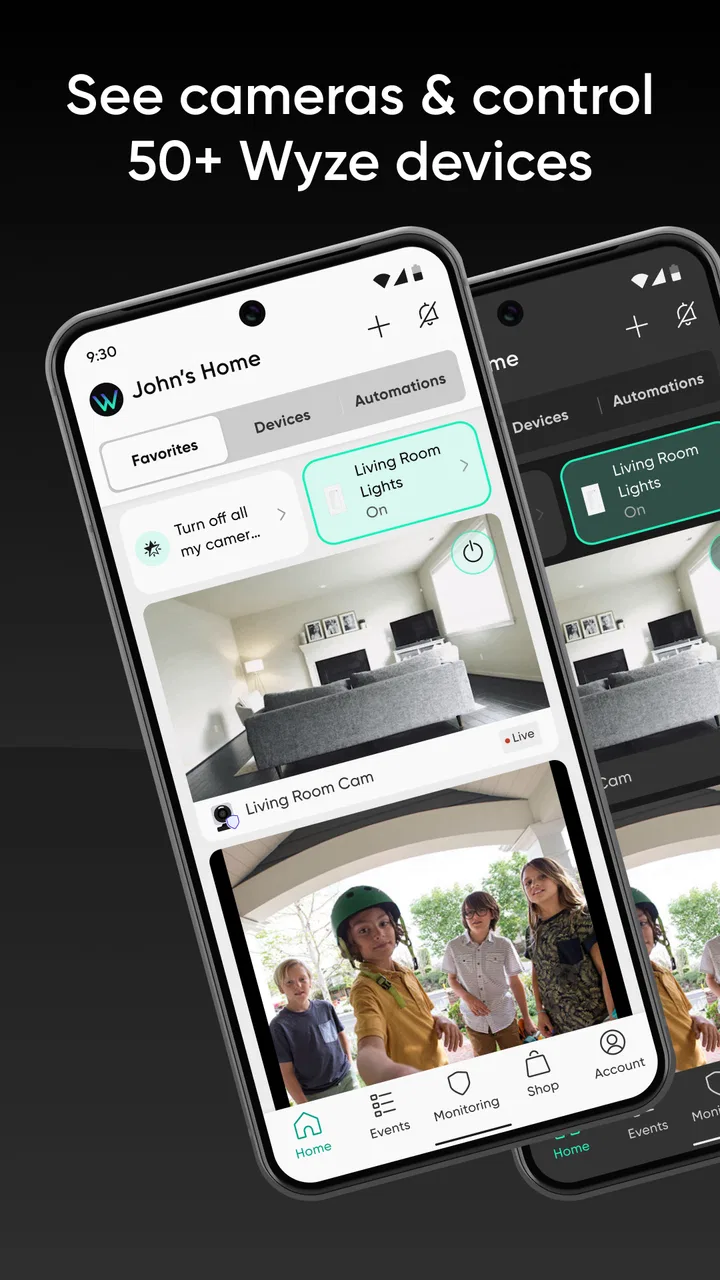
In everyday use, the strongest idea is the central dashboard. Instead of jumping between separate device applications, I can think of the home as one setup and move between the tools that belong to it. That is particularly useful when I am leaving the house: I can check the relevant devices from one familiar place rather than remembering several app layouts.
A realistic example is arriving at work and wondering whether I handled everything before leaving. I can open the app, check the devices connected to my home, and use the available controls for the situation rather than physically turning around. The benefit is not dramatic automation; it is reducing small moments of uncertainty. That makes the app most appealing to people who already use Wyze hardware and want a consistent way to reach it.
There is a trade-off. A single dashboard can become crowded as the number of devices grows. Clear names help more than people expect, so I would name devices by location and purpose instead of accepting vague defaults. “Front entry” tells me more than a model name when I am checking the house quickly. I would also remove old devices rather than allowing a previous room or temporary setup to remain in the account indefinitely.
Controls deserve a deliberate setup
The best way to use this app is to spend time on setup before relying on it remotely. I would begin with one device, confirm that I understand its status and controls, and only then add more. This staged approach makes it easier to identify whether a problem comes from the app, the device, the home network, or an account setting.
I would also avoid treating notifications as harmless background noise. Alerts can be useful when they draw attention to something important, but too many can train me to dismiss everything. My practical approach is to enable only the notifications that support a clear decision, then adjust them after a few days of normal use. If the phone becomes busy with low-value alerts, the app is no longer helping me monitor the home; it is creating another stream to manage.
Another non-obvious habit is to test the app at the exact moments when I expect to depend on it. I would check it from outside the home, on the connection I normally use while away, and at a time when a delayed response would matter. A setup that works perfectly on home Wi-Fi may feel different when I am travelling or using mobile data. Testing early is safer than discovering the limitation during an urgent check.
Privacy-sensitive moments need extra attention
The most sensitive use case is not necessarily a dramatic security event. It can be an ordinary moment: checking a room while guests are present, viewing an entry area when a delivery worker is nearby, or sharing access with a family member. I would make sure everyone who may be affected understands when the devices are active and who can reach them. That is a household conversation, not something an app can solve by itself.
I am careful with device names and account sharing for the same reason. A label can reveal more than intended if it appears in a notification or is visible to someone looking over my shoulder. I prefer neutral but useful names, and I would rather use the app’s account and access controls than pass around my personal login. If another person needs access, giving them an appropriate account route is more responsible than sharing a password.
When I am reviewing an app that can connect me to a home, I also pay attention to the choices shown during installation and sign-in. I read permission prompts in context, allow only what matches the feature I am trying to use, and revisit the phone’s permission manager if my use changes. I do not assume that a convenient prompt should be accepted permanently. The safest setup is the one I can explain to myself later.
This cautious approach does not mean I consider Wyze unusable. It means I treat it as a sensitive tool. The app can be perfectly reasonable for a user who is willing to maintain an account, review device access, and make intentional notification choices. It is less suitable for someone who wants to install an app, skip every prompt, and never think about connected-home settings again.
What the purchase model changes
The free installation lowers the barrier to trying the app, but the in-app purchase range means I would not judge the complete experience from the download alone. Before buying anything, I would identify the exact problem I am trying to solve: remote access, additional service capacity, or a feature tied to a particular device. A purchase is easier to evaluate when it answers a specific need rather than simply adding another option to the dashboard.
I also recommend checking whether a paid capability changes the way you expect to use the app over time. Someone who only wants occasional manual checks may not need the same extras as a household that depends on regular monitoring. The right choice depends on the devices and workflow already in place. I would not pay for a feature merely because it appears prominently; I would first confirm that it improves a real routine.
This is one area where a simpler alternative can be better. If your priority is avoiding recurring decisions and keeping the setup minimal, a standalone product with fewer connected services may feel more comfortable. Wyze makes more sense when the convenience of its wider ecosystem outweighs the effort of understanding the available options.
Who will get the most from it
I see the app working best for people who already own, or are considering, several Wyze devices. They can benefit from one account, one familiar interface, and a shared way to check the home. It is also a sensible fit for someone who wants remote awareness without building a complicated smart-home system from many brands.
It can help a busy household divide responsibilities, too. One person may handle setup while another checks the home during the day, provided access is arranged carefully. I would agree on device names and notification expectations first, because confusion between household members can turn a useful dashboard into a source of duplicate alerts and mistaken assumptions.
Renters may also appreciate the idea of a flexible setup, but I would consider placement, permission from the property owner where appropriate, and what happens when moving out. Removing a device from a room is not the same as removing every related account or access arrangement. Before leaving a property, I would review the device list and shared access rather than assuming the next resident cannot see anything.
Who should choose something else
I would hesitate to recommend Wyze to someone who wants a strictly local setup, has no interest in creating an account, or dislikes managing connected devices through a broader ecosystem. The app’s strength comes from bringing remote and centralized control together, so a person who sees that connectivity as a drawback may be happier with a more limited alternative.
I would also look elsewhere if all I needed was one narrow function and the extra dashboard would add friction. A dedicated app from a single-purpose device can be easier for an older family member or anyone who values a very small number of controls. Likewise, users committed to a different smart-home platform may prefer staying within that platform instead of adding another account and another device family.
That comparison is not a criticism of Wyze so much as a reminder that “smarter” is not always the same as “simpler.” The app consolidates a lot, but consolidation asks the user to learn its organization and keep the account tidy. I would choose it for connected-home breadth, not for the absolute minimum number of settings.
My practical setup routine
After installing it, I would use a short checklist. First, I would sign in with a password that is not reused elsewhere. Next, I would add a single device and verify its name, status, and basic controls. Then I would review notifications and phone permissions instead of accepting every choice automatically. Only after that would I add additional devices or consider an in-app purchase.
I would keep a simple record of which household members have access and remove anyone who no longer needs it. I would also revisit the device list after moving equipment between rooms. This sounds mundane, but stale entries are exactly the sort of small organizational problem that makes a home app harder to trust.
For travel, I would test the app before leaving, not after reaching the airport. I would confirm that I know which device to open and what an expected status looks like. If the app is used for a time-sensitive check, I would avoid relying on a single notification as proof that everything is fine; I would open the relevant device view and interpret the information in context.
Finally, I would review purchases with the same care as permissions. The listed price range runs from $2.99 to $259.99 per item, so the financial commitment can vary substantially. I would read the purchase description, check the billing terms presented by the store, and decide whether the feature is necessary for my actual routine. Free to install does not mean every part of the experience is free, and knowing that upfront makes the app easier to evaluate fairly.
My cautious verdict
After looking at Wyze as both a home tool and an account-based service, I think it is a good choice for users who want a central way to manage compatible Wyze hardware and are willing to make thoughtful decisions about access, notifications, permissions, and purchases. Its established presence, 4.4 average rating, and more than 5 million installs make it easy to see why it attracts attention, but popularity should be treated as context rather than a substitute for personal judgment.
I like the practical value of checking a connected home from one place, especially when several devices are involved. I also appreciate that the app can fit ordinary routines rather than demanding a complex automation project. My reservations are equally practical: the wider setup can require maintenance, paid options need careful reading, and privacy-sensitive devices deserve more attention than a casual lifestyle download.
My recommendation is conditional: try it if you want the Wyze ecosystem and will actively manage the account. Start small, use clear device names, limit notifications to useful events, and test remote access before depending on it. If you want a completely local experience, no account responsibilities, or only one very simple control, a narrower alternative may serve you better. For the right household, though, this free Lifestyle app can turn a collection of compatible devices into a more manageable daily routine without pretending that convenience removes the need for care.
FAQs for Wyze - Never Wonder
01What features does the Wyze app offer to enhance home automation?
The Wyze app provides a range of features to enhance your home automation experience. It allows you to control smart devices like cameras, lights, and locks remotely. You can set schedules, create automation rules, and receive real-time alerts. The app also supports voice control through Alexa and Google Assistant, ensuring seamless integration with your smart home ecosystem.
02Is the Wyze app compatible with both Android and iOS devices?
Yes, the Wyze app is compatible with both Android and iOS devices. You can easily download it from the Google Play Store for Android devices or the Apple App Store for iOS devices. The app is designed to work seamlessly across different platforms, providing a consistent user experience whether you’re using a smartphone or tablet.
03How user-friendly is the Wyze app for beginners?
The Wyze app is designed with user-friendliness in mind, making it accessible for beginners. It features an intuitive interface with straightforward instructions, which simplifies the setup process for new devices. The app provides easy navigation and clear options, allowing users to manage their smart home devices without technical expertise. Tutorials and customer support are also available for additional assistance.
04Are there any subscription fees associated with using the Wyze app?
The Wyze app itself is free to download and use. However, some advanced features, like cloud storage for video footage from Wyze cameras, may require a subscription to Wyze Cam Plus. This service offers enhanced functionality, such as longer video recordings and AI-powered notifications. Users can evaluate their needs and decide if the subscription provides value for their specific use case.
05How secure is the Wyze app in terms of protecting user data?
Wyze prioritizes user data security by implementing robust encryption protocols and regular security updates. The app uses end-to-end encryption to protect data transmitted between devices and the cloud. Wyze also adheres to industry standards for data protection and privacy. Users are encouraged to enable two-factor authentication for an added layer of security to safeguard their personal information.
Pros
- User-friendly interface for easy navigation.
- Affordable smart home solutions.
- Wide range of device compatibility.
- Regular updates enhance functionality.
- Excellent customer support.
Cons
- Limited advanced automation features.
- Occasional connectivity issues.
- Subscription required for some features.
- App may lag on older devices.
- Limited integration with third-party apps.

Wyze - Never Wonder
Gallery